
Glossary
FDM: Fused Deposition Modeling, an additive manufacturing method that builds an object by melting material layer by layer.
Overhang: Any part of a print that extends outward without support.
Post processing: Any process performed on the finished part, such as support removal, sanding etc.
PVA: Polyvinyl alcohol, a water soluble material that is mainly used in 3D printing as support material.
Support
What is Support?
FDM printers build objects layer by layer, each one on top of the one below. Supports are used to support the overhanging parts of the object for a successful print by providing a surface for them to be printed on top of. After the print, support structures are removed from the print (see Post processing guide).
Why is Support important?
If an object has an unsupported overhang the material will come out the nozzle and just fall instead of creating the desired structure, as shown in figure below.
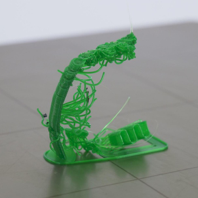
Depending on the part shape, printing can be physically impossible without the supports. However, there are disadvantages that need to be taken into consideration:
- Increased material consumption
- Longer print time
- Low surface quality when supports are removed
- The potential need of post-processing
When to use Support
Supports are used in the presence of the bridges or overhangs in the object, as shown in figure below.
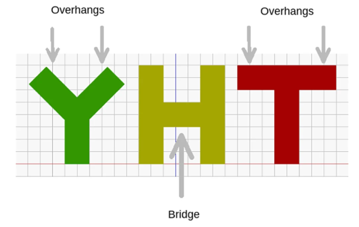
Not all the overhangs or bridges need supports, up to some point, FDM printers can build objects by printing with small offsets in consecutive layers. Your slicing software will automatically detect and add supports to a model if you select the support option. Different materials and printers have different overhang angles. As a rule of thumb, you can use supports when:
- The overhang angle is more than 45o
- The bridge is longer than 5 mm
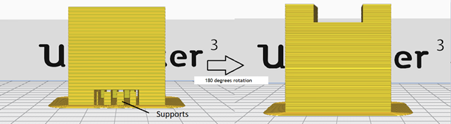
By changing the orientation of the object on the build plate, it is possible to avoid supports. Figure below shows that by only rotating the part, print can be completed without supports.
Support Types
For FDM printers, mainly two types of supports are used.
Break-away supports
In this case, supports are removed by breaking them off when the print is complete. These supports can be made from the same material of the object (the only option if the 3D printer only has one nozzle) or a different material (such as “Breakaway”, a material specifically designed to be removed from the model easily. In this case, supports are removed by breaking them off when the print is complete.
Pros:
- Doesn’t require multiple extruders
- Easier to print
- Cheap
Cons:
- Risk of damaging the part (particularly for small or delicate parts)
- Residual material on the surface requiring sanding
- Practical difficulties in removing the support
- Inability to remove the support from internal cavities
In general, models with large flat external surfaces work best with this kind of support. Also note nozzle size: The larger a nozzle, the thicker the supports and thus the harder it is to remove. For example 0.25mm nozzle PLA support material is very easy to remove whereas at 0.8mm it is extremely difficult.
Dissolvable supports
Multiple extruder printers can use a different material for support structures that can be dissolved away in a solution. For example PVA, or polyvinyl alcohol, this solution is water. By submerging the part inside warm water after the print, it is possible to remove PVA supports which results in better surface quality. You don’t need to wait until all the supports are dissolved (can take several hours if the part is big), 10 minutes of submerging in warm water will make it much easier to remove supports with pliers. If you are using PVA for an internal cavity, make sure there is a hole for water to get in and out. A lot of people use supports (especially PVA) when they don’t need to, if you are unsure, ask a studio technician for advice.
Pros:
- Better surface quality when removed.
- Easier to remove
- Lower risk of part damage in post processing
Cons:
- Requires multiple extruders
- More costly
- Risk of toxic fumes
Support Settings in Different Slicing Software
CURA (link to top level guide)
In Cura, supports can be changed like this:
'Animated Gif Here'
ideaMaker (link to top level guide)
In ideaMaker, support settings can be changed like this:
'Animated Gif Here'
PrusaSlicer (link to top level guide)
To be added later
See also
You may also wish to review:
3D Printing Directory
FDM Directory
Material Guide


